01
Native apps
The apps are part of the job.
Give your bot a way to see and interact with native apps on the phone. It can tap, swipe and type through the screen.
A real phone for your AI assistant
Fonino connects your assistant to a physical iPhone device. Use native apps, the Safari browser and Messages on your behalf.
14 days free, then $9/month for life (founding price). Uses your spare iPhone + a Mac.
 Grok Bot
 Muse
 Hermes
 dots
 Claude DuetGrok BotOn its iPhone
iMessage: no API for AI agents
YouText Sam on iMessage that I'm running 10 minutes late.
Sent. You approved it with one tap.
A phone opens another door
A blocked website can stop a task. An app-only service can be out of reach. Fonino adds a physical iPhone, with native apps and a browser running on the device.
Native apps
Give your bot a way to see and interact with native apps on the phone. It can tap, swipe and type through the screen.
On-device browsing
Let your bot browse from the phone itself, using the device’s browser and signed-in sessions.
Messaging
Give your assistant access to Messages on its own device. Sending through the iMessage service and delivery checks have been tested in the pilot.
A real device gives your bot another way to work. Apps and websites can still require verification or restrict access.
Plans
Founding price · limited to the first 100 members
$9$19 /month, for life · 14 days free, no card
Use a spare iPhone and your own Mac. Plug it in, open the Fonino app, and it sets up the rest. Your bot uses your phone’s number.
No spare iPhone
$149/month, billed annually
A dedicated iPhone in our rack, on Wi-Fi, kept charged, updated and online around the clock. You sign it in with your Apple Account; we handle everything else. Apps, Safari and iMessage; no phone line needed.
Start in your assistant. Paste this into Grok Bot or Muse and follow along:
Set me up with Fonino so you can use a real iPhone for me. Read https://api.fonino.app/setup.md and walk me through it one step at a time: tell me exactly what to click, type or tap, and wait until I say done before the next step.Have a spare iPhone and a Mac? Your assistant sets you up with BYOF. No spare iPhone? It points you to a hosted phone we run for you. You’ll need a Mac (Apple silicon) and your iPhone plugged into it by USB. About 10 minutes. Your assistant signs you up (free trial) and walks you through installing the Fonino app on your Mac, which sets up your iPhone. Using Claude Code or Codex? Paste it there and it does the steps for you.
From chat to phone
Paste one message into Grok Bot or Muse. It walks you through signing up and setting up your phone, then connects itself.
Your bot sees the phone’s screen, taps, swipes and types, then looks again to check the result.
Open the live view to follow along. Take over when the task needs a human, then hand the phone back.
Small pilot. Real devices. Fonino has been tested with both Grok Bot and Muse on physical iPhone devices. We’ll help you test the workflows that matter to you.
You stay in control
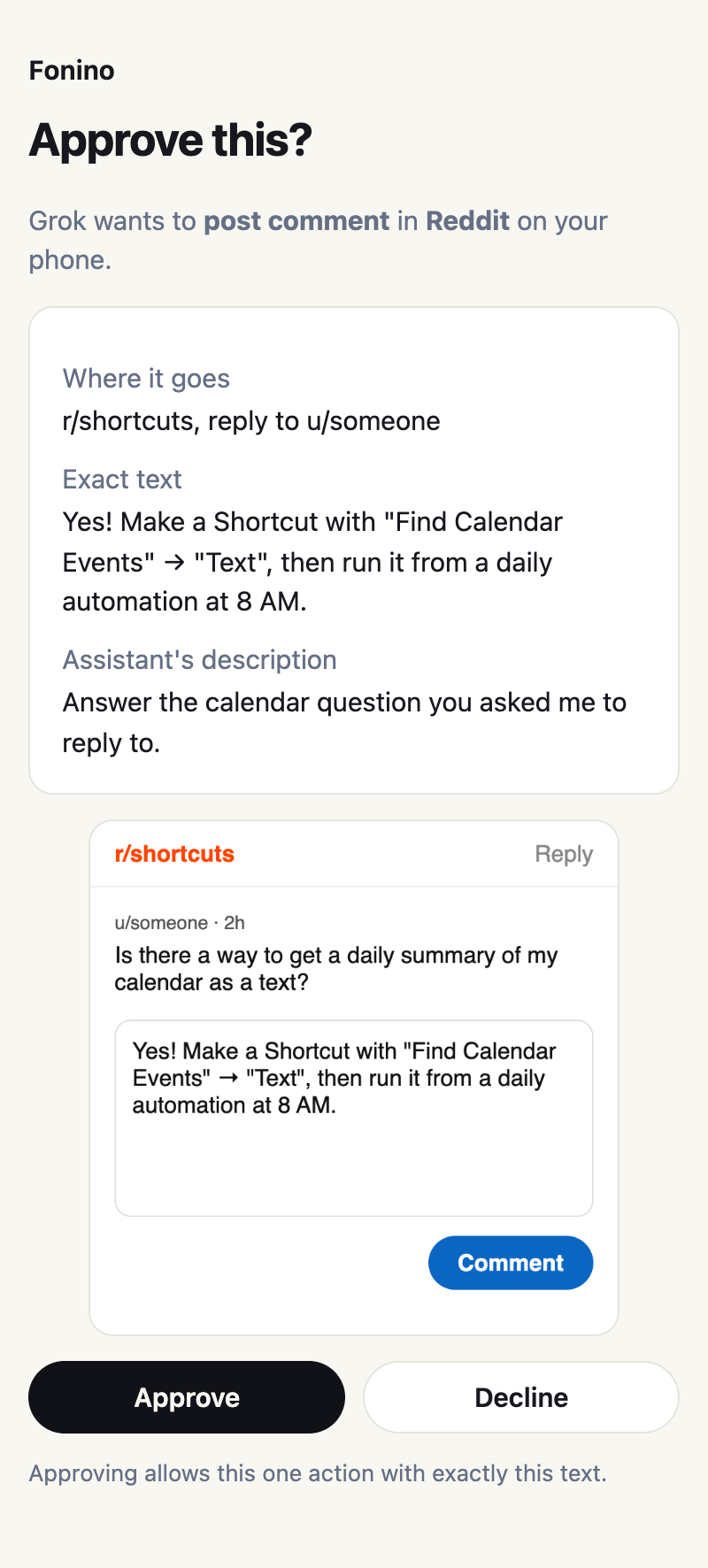
When your bot is about to post, reply or send a text, it shows you a link right in the chat. One tap opens this: where it goes, the exact text, and the phone’s screen. Approve or decline, and your bot carries on.
Other agents
Fonino speaks MCP, the open standard for agent tools. Any agent that can add a remote MCP server can use the phone, with the same approvals and limits.
Guide
Nous Research's open-source agent. Three lines of config, one sign-in, and Hermes runs on your own model.
Set up HermesConnectors
Add Fonino as a custom connector in Claude, or with one command in Claude Code, and sign in with your Fonino email.
See howDevelopers
Your own agent or code: OAuth 2.1 or an API key, a documented tool set, approvals and clear error codes.
Read the docsOpen source
Fonino's Mac side is open source. It runs on your Mac, works with Claude Code, Codex or any MCP client, and in beta it can also drive Android phones.
Beta
Controls an Android phone or the Android emulator over USB debugging, with nothing to install on the phone. Same approvals and off-limits apps as on iPhone. Tested on the emulator so far; the Fonino app and plans are iPhone only for now.
Android setupMIT license
The command-line tool, the phone adapters and the MCP server with its approvals and safety rules. Read the code, run it yourself, or contribute.
View the codeDevelopers
Paste one prompt into Claude Code or Codex on your Mac. It installs Fonino and walks you through connecting your phone, and stops whenever a step needs your hands.
Get the promptOr install it from npm. On a Mac with Node 22 or later:
npm install -g fonino && fonino doctorThen fonino devices lists your phones and fonino mcp connects your agent. Also in the MCP Registry.
A few practical details
You stay in control. Anything that posts or sends under your name, and anything that buys, waits for your one-tap approval, showing the exact text or items. Settings, Wallet, Passwords, Mail and calls are blocked for assistants, texts have sending limits, and at passwords or 2-factor codes your assistant hands the phone to you. You can watch live and disconnect anytime. Read how security works.
Yes. Fonino connects your assistant to a physical, non-jailbroken iPhone device. The apps and Safari run on that phone.
In beta, in the open-source version: it drives Android phones and the Android emulator from your Mac over USB debugging, with the same approvals and blocked apps. So far it has been tested on the Android emulator. The Fonino app and plans support iPhone only for now. Note that a few apps, mostly banking and payment apps, refuse to run while USB debugging is on.
No. The Fonino app installs a small helper on your iPhone and Fonino keeps it signed for you, so there's nothing to sign or renew. You need a Mac with Apple silicon, and to turn on Developer Mode once on the iPhone; the app tells you exactly when and where.
Not every workflow has been tested. Compatibility depends on the app, its sign-in requirements and your assistant’s ability to navigate it. Tell us your use case so we can test it together.
No. Fonino changes where your bot works: native apps and the browser on a physical phone. Websites and apps can still apply their own checks and restrictions.
Grok Bot and Muse. Both have been tested with Fonino on physical iPhone devices, and so has Hermes Agent. Any agent that supports remote MCP servers can connect: see the documentation. Individual app and workflow compatibility can vary.
With BYOF your bot uses your own iPhone, so its line works as usual; sending through iMessage has been tested, and SMS still needs validation. A hosted phone runs on Wi-Fi without a phone line: it texts through iMessage from your Apple Account (people on Android can’t be reached) and doesn’t place phone calls. Want SMS and a number? Bring your own eSIM plan: you add it yourself in the live view during setup, and we never see the activation code. Live voice calls are in development.
Pick a plan above. BYOF starts with a free trial (14 days, no card needed, then the $9/month founding price): you’ll get an email to sign in, run our installer on your Mac and follow the setup page. With a hosted phone we prepare the device and email you to finish setup together, and if it isn’t for you, you get a full refund within 30 days.
The first 100 BYOF members pay $9/month instead of $19 for as long as their subscription stays active. If you cancel and subscribe again later, the regular price applies. One founding price per person.